:
:
:
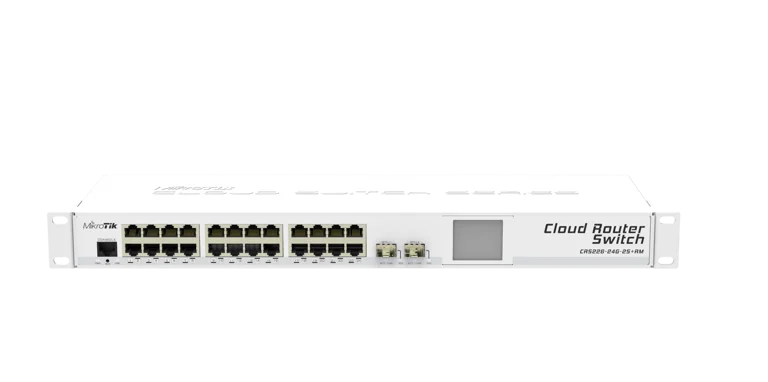
Overview
Provide high-density Gigabit switching and fast 10GbE optical uplinks with the MikroTik Cloud Router Switch CRS226-24G-2S+RM. Housed in a 1U rack-mountable chassis, this managed switch features 24 Gigabit Ethernet ports and two 10G SFP+ cages (SFP1 port supports 1.25G/10G, SFP2 port supports 10G only). Driven by a 400 MHz processor and running full-featured RouterOS Level 5, it offers an integrated touchscreen LCD for quick status monitoring, advanced Layer 2 switching, and dynamic Layer 3 routing capabilities.
Key Features
- High-Density Port Configuration: Equipped with 24× Gigabit Ethernet ports (10/100/1000 Mbps) for broad endpoint and network connection density.
- Dual 10G SFP+ Uplinks: Includes 2× 10G SFP+ cages for high-bandwidth server links and core network uplinks.
- Full RouterOS Level 5 OS: Pre-installed with RouterOS Level 5, offering comprehensive VLAN management, dynamic routing, firewall protection, and bandwidth control.
- Color Touchscreen LCD: Integrated front-panel touchscreen LCD display for quick status monitoring, interface configuration, and network diagnostics.
- 1U Rack-Mount Chassis: Comes complete with rackmount ears for seamless installation into standard 19-inch equipment racks.
- Flexible Power Options: Powered via standard rear DC jack or Passive Power over Ethernet (PoE-In) on Port 1.
Specifications
| Attribute | Specification |
| Model | MikroTik Cloud Router Switch (CRS226-24G-2S+RM) |
| Architecture / Processor | MIPSBE / Qualcomm Atheros QCA8519 (1 Core @ 400 MHz) |
| Memory & Storage | 128 MB RAM, 128 MB NAND Flash Storage |
| Ethernet Ports | 24× Gigabit Ethernet Ports (10/100/1000 Mbps) |
| SFP+ Ports | 2× 10G SFP+ Cages (SFP1: 1.25G/10G; SFP2: 10G only) |
| Console Port | 1× RJ45 Serial Console Port |
| Operating System | RouterOS (License Level 5) |
| Display | Color Touchscreen LCD Panel |
| Power Inputs | DC Jack (8–28V) or Passive PoE-In on Port 1 (8–28V) |
| Max Power Consumption | 19 W |
| Form Factor | 1U 19-inch Rackmount (443 × 145 × 44 mm) |

To install this Web App in your iPhone/iPad press
 and then Add to Home Screen.
